If you’ve got BNB sitting in your wallet, and want to buy CAKE, or maybe a newer token that hasn’t hit a centralized exchange yet. PancakeSwap is where that happens for millions of users.
But here’s the reality: swapping on a decentralized exchange isn’t like clicking “Buy” on Coinbase. There’s no support team to reverse a mistake. You’re interacting directly with smart contracts. One wrong slippage setting, one wrong token address, and your money is gone.
This guide walks you through exactly how to swap on PancakeSwap, what to watch out for, and how to avoid the errors that trip up even experienced traders. No fluff. Just the process that works.
What Is PancakeSwap and Why It Matters
PancakeSwap is a decentralized exchange built primarily on BNB Chain (though it now supports Ethereum, Solana, Base, Arbitrum, and several other networks) . Unlike Binance or Coinbase, PancakeSwap never holds your funds. You trade directly from your own wallet. You maintain 100% ownership of your crypto at all times .
The platform uses an Automated Market Maker model. Instead of matching buyers and sellers through an order book, PancakeSwap uses liquidity pools pools of tokens locked in smart contracts that facilitate trades .
The Smart Router automatically finds the best path for your trade across multiple pool versions (V2, V3, StableSwap) to get you the best price .
Why traders use PancakeSwap:
- Low fees: Trading fees start as low as 0.01% for stable pairs
- No account needed: Connect wallet, start trading. No KYC, no registration
- Early access: Many new tokens list on PancakeSwap before centralized exchanges
Requirement Before Begining Swap Process:
Before you swap anything, get these three things in order.
| Requirement | Details |
|---|---|
| Wallet | MetaMask, Trust Wallet, SafePal, or any BNB Chain-compatible wallet |
| BNB for gas | Every transaction costs gas. Keep at least $2-5 worth of BNB in your wallet |
| Tokens to swap | The token you want to trade from must be in your wallet |
One critical warning: Never share your seed phrase with anyone. PancakeSwap will never ask for it. No legitimate DEX will.
How to Swap on PancakeSwap (Detailed Procedure)
Step 1: Connect Your Wallet
Go to the official PancakeSwap exchange page. Look for the “Connect Wallet” button in the top right corner .
Click it and select your wallet provider. A popup from your wallet will ask you to approve the connection. This doesn’t cost gas, you’re just granting the site permission to see your public address and request transactions.
Pro tip: Bookmark the official PancakeSwap URL. Fake PancakeSwap sites are a common phishing tactic. Always verify you’re on the right domain.
Step 2: Select Your Tokens
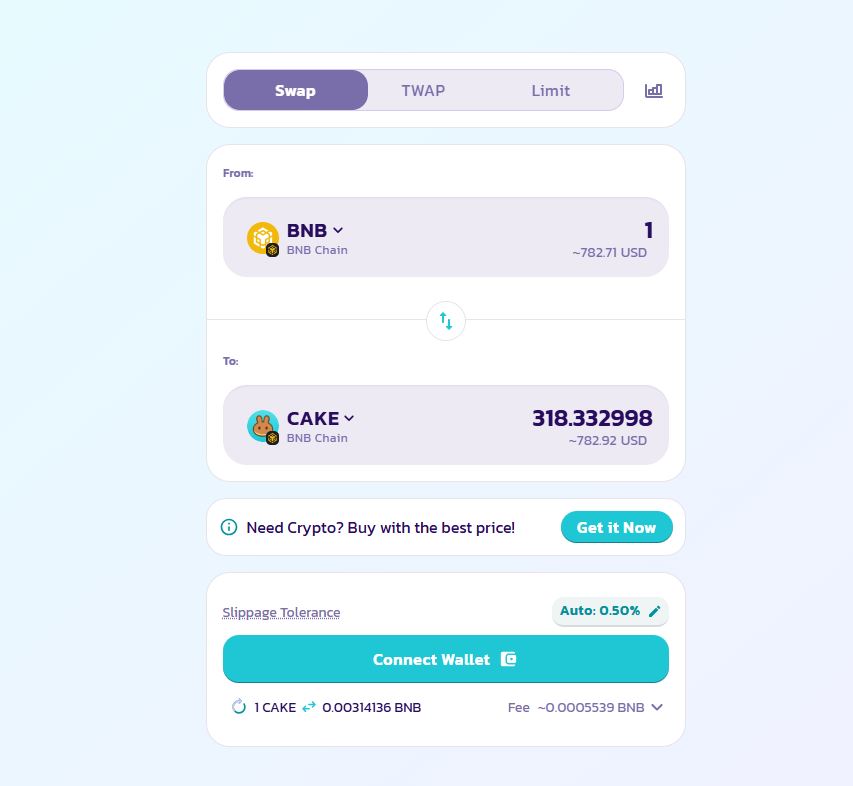
The swap interface has two fields:
- Top field (“From”): The token you’re selling
- Bottom field (“To”): The token you want to buy
Click the dropdown on the top field and select your token. Your balance will display above it . Then select your target token in the bottom field.
If you don’t see your token listed, paste its contract address into the search field. Always verify the contract address from an official source. Anyone can create a fake token with the same name. The contract address is the only thing that matters.
Step 3: Enter Your Amount
Type the amount you want to swap in either field. The other field auto-calculates based on current pool prices .
Before you proceed, check these numbers:
- Expected output: How much you’ll receive
- Price impact: How much your trade moves the market price. Anything above 5% deserves scrutiny
- Minimum received: The floor. If the price moves against you beyond your slippage tolerance, the transaction reverts
- Trading fee: Usually 0.25% for V2 pools, but V3 pools have tiers from 0.01% to 1%
Step 4: Approve the Token (First-Time Only)
If this is your first time swapping this specific token, you’ll see an “Enable” or “Approve” button instead of “Swap” .
This is an ERC-20/BEP-20 standard requirement. You’re granting the PancakeSwap smart contract permission to access that specific token in your wallet. This is a separate transaction that costs gas.
Important nuance: When approving, you can usually choose between approving a specific amount or unlimited approval. Unlimited approval saves gas on future swaps but carries more risk if the contract is ever exploited. For tokens you trade frequently, unlimited is convenient. For one-off swaps, approve only what you need.
Step 5: Execute the Swap
Once approved, the button changes to “Swap.” Click it.
A confirmation window appears with all the details: exchange rate, slippage tolerance, minimum received, price impact, and fees . Review everything. If something looks wrong, especially the price impact, cancel and reassess.
Click “Confirm Swap.” Your wallet will pop up asking you to sign the transaction. This is the actual on-chain transaction that costs gas. Confirm it .
Step 6: Wait for Confirmation
Your transaction enters the mempool and gets picked up by validators. On BNB Chain, this usually takes 3-5 seconds. Once confirmed, the new tokens appear in your wallet automatically.
You can click “View on BscScan” to see the transaction details on the blockchain explorer .
Understanding Slippage and Why It Breaks Trades
Slippage is the difference between the price you expected and the price you actually get. It exists because prices in liquidity pools change as trades execute.
PancakeSwap defaults to 0.5% slippage tolerance. If the price moves more than that between when you submit and when the transaction confirms, it fails.
When to adjust slippage:
| Scenario | Recommended Slippage |
|---|---|
| Stable pairs (USDT/BUSD) | 0.1% or lower |
| Major pairs (BNB/CAKE) | 0.5% (default) |
| Low-liquidity tokens | 1-3% |
| Tokens with transfer tax | Tax % + normal slippage |
Warning: High slippage isn’t free money for you. It means you’re accepting a worse price. If you need 12% slippage (as with tokens like SafeMoon that charge a 10% transfer fee), understand why before you trade .
Common Swap Errors Users Face and Their Fixes:
Even experienced users hit errors. Here’s what they mean and how to resolve them.
“Transaction cannot succeed”
Usually means low liquidity for your trade size. Try a smaller amount or increase slippage tolerance .
“Price Impact too High”
Your trade is too large relative to the pool. Split it into smaller trades or find a different pool.
“Insufficient funds for transfer”
You don’t have enough BNB to cover gas. Add more BNB to your wallet .
“TransferHelper: TRANSFER_FROM_FAILED”
Either insufficient token allowance or insufficient balance. Check both .
“Execution reverted” on a token you just received from an airdrop
This is often a scam. The token contract may prevent selling. Don’t approve it. Don’t follow links associated with it .
FAQs About Swapping on PancakeSwap
Get quick answers to common questions about swapping tokens, gas fees, slippage, price impact, approvals, and transaction safety on PancakeSwap.
Do I need BNB to swap on PancakeSwap?
Yes. Every swap is an on-chain transaction that requires gas. On BNB Chain, gas is paid in BNB. Keep at least $2–$5 worth in your wallet to avoid failed transactions.
What’s the difference between PancakeSwap V2 and V3?
V2 uses the traditional constant product model with a flat 0.25% fee. V3 introduces concentrated liquidity, multiple fee tiers ranging from 0.01% to 1%, and greater capital efficiency. The Smart Router automatically routes your trade through the version that provides the best available price.
Why did my swap fail even though I set slippage high enough?
Several reasons can cause a swap to fail. The token might have a transfer tax that exceeds your slippage tolerance, the pool might lack sufficient liquidity, or the token contract might have restrictions on who can sell. Check the token’s contract or official community channels before trying again.
What is price impact and when should I worry?
Price impact measures how much your trade changes the pool price. Under 1% is generally normal for many trades. Between 1% and 5% means your trade is significant relative to the pool. Above 5% is a warning sign that you may be receiving a materially worse price.
Can I swap tokens on PancakeSwap without paying gas?
No. Swapping is an on-chain activity and normally requires gas. PancakeSwap also offers a PancakeSwap X feature that can route some trades through a market maker with zero gas cost for the swap itself, but token approval can still require gas.
How do I know if a token is safe to swap?
You cannot determine this with certainty. However, you can reduce risk by verifying the contract address through official sources, checking whether the token has a transfer tax, reviewing whether liquidity is locked or burned, and examining holder distribution. Avoid tokens you receive unexpectedly through unsolicited airdrops.
What happens if I set unlimited token approval?
Unlimited approval means the PancakeSwap contract can spend that token from your wallet without requiring another approval transaction. This can save gas on future swaps. However, if the approved contract is exploited or compromised, your entire balance of that token could potentially be drained. For active traders, it is a calculated trade-off between convenience and security.
Can I cancel a swap after I’ve confirmed it?
Once a transaction is confirmed on-chain, you cannot cancel it. Before confirmation, you may be able to submit a replacement transaction with a higher gas fee, often called a “speed up” in MetaMask, but you cannot simply cancel a confirmed transaction. This is why it is important to review the transaction details before signing.