You’re holding Solana (SOL) in your Phantom wallet, and you want to convert it to USDT. Maybe you’re looking to lock in profits after a price run-up, or perhaps you need a stablecoin to pay for something without cashing out to fiat. Whatever the reason, swapping SOL to USDT directly inside Phantom is one of the fastest ways to do it.
No need to send your tokens to a centralized exchange, wait for confirmations, and deal with withdrawal fees.
The entire process takes less than a minute once you know where to click. But there are a few nuances that can trip you up, especially around fees and slippage settings. Let’s walk through the exact steps, then cover the questions people ask most often.
Why Swap SOL to USDT in Phantom?
Phantom isn’t just a wallet anymore. It’s a full-featured trading interface that routes your swaps through decentralized exchanges (DEXs) on Solana to find the best available rates. When you swap SOL for USDT, you’re not dealing with an order book or a centralized counterparty. You’re interacting with on-chain liquidity pools.
The appeal is simple: speed and control. Solana transactions confirm in seconds, and you never lose custody of your assets during the swap. Your USDT lands right back in your Phantom wallet, ready to hold, send, or deploy elsewhere.
Step-by-Step: Swapping SOL to USDT
The process differs slightly depending on whether you’re using the Phantom mobile app or the browser extension. The mobile app is more common, so let’s start there.
Mobile App
Step 1: Open the Trade Tab
Open Phantom on your phone. At the bottom of the screen, tap the Trade tab. Alternatively, you can tap the + button and select Trade from the menu.
Step 2: Choose Your Tokens
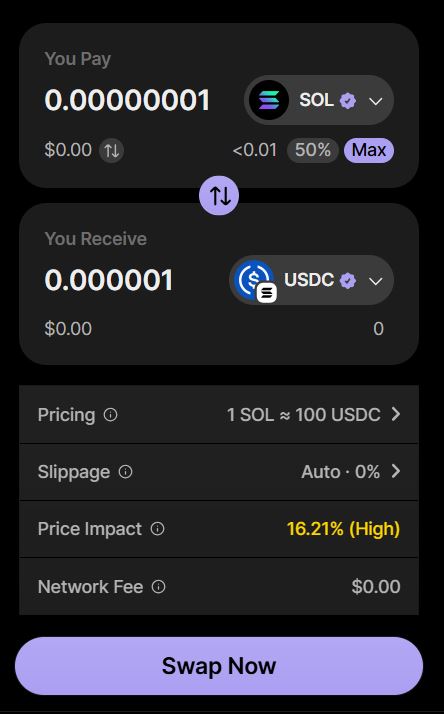
In the You Pay field, select SOL. This is the token you’re swapping out of. In the You Receive field, choose USDT. If USDT doesn’t appear in your recent tokens, search for it. Make sure you’re selecting USDT on Solana, not USDT on another network.
Step 3: Enter the Amount
Type in how much SOL you want to swap. You can tap Max to swap your entire balance, but be careful. You need to leave a small amount of SOL in your wallet to cover network fees. If you swap every last fraction of SOL, the transaction may fail.
Step 4: Review the Quote
Phantom will display the amount of USDT you’ll receive. Before you confirm, tap the settings icon in the upper right corner. Here you can see the provider routing your swap, the slippage tolerance, and the priority fee.
Step 5: Adjust Settings (If Needed)
- Slippage: Phantom defaults to Auto, which works for most swaps. If your transaction fails repeatedly, try setting slippage to 1% or higher.
- Priority Fee: Leave this on Auto unless the network is congested and your transaction is stuck. A higher priority fee gets your swap processed faster.
Step 6: Confirm the Swap
Tap Swap Now. Phantom will show a final review screen with the details. Confirm the transaction. You may need to authenticate with your wallet password or biometric login.
Step 7: Check Your Balance
The swap should complete within seconds. Your USDT balance will appear in your Phantom wallet. If it doesn’t show up immediately, pull down to refresh or check the transaction in the History section.
Browser Extension
The process is nearly identical. On the Home tab, click Swap. Select SOL as the token you’re paying with and USDT as the token you’re receiving. Enter the amount, review the quote, adjust settings if necessary, and click Swap Now.
Understanding the Fees
A swap from SOL to USDT can involve up to three separate costs. Knowing what they are helps you avoid surprises.
| Fee Type | What It Is | Typical Amount |
|---|---|---|
| Phantom Fee | Phantom’s service fee for routing the swap | 0.85% on select pairs |
| Network Fee | Paid to Solana validators to process the transaction | Fractions of a cent in SOL |
| Price Impact | The cost of trading against on-chain liquidity | Varies; higher for large trades |
The Phantom fee is the one people notice most. At 0.85%, swapping $1,000 worth of SOL would cost about $8.50 in Phantom fees alone, plus the network fee and any price impact. That’s not trivial, but it’s the trade-off for the convenience of not leaving your wallet.
If you’re swapping a large amount, split it into smaller transactions. A single massive swap can move the market price against you significantly, resulting in a worse rate. Two or three smaller swaps often net you more USDT.
Common Problems and How to Fix Them
Even a straightforward swap can fail for a few reasons. Here’s what to do when things go wrong.
“Insufficient funds” or “Not enough SOL”
This is the most common error. You need SOL in your wallet to pay the network fee, even if you’re swapping another token. If you’re trying to swap your entire SOL balance, leave a small amount—around 0.01 SOL is usually enough.
Swap simulation failed
Phantom simulates every transaction before submitting it. If the simulation fails, the swap won’t go through. Common causes include slippage being set too low or the token having trading restrictions. Try increasing slippage to 1% or 2%.
“No quotes available”
This usually means there isn’t enough liquidity for your trade size. Try swapping a smaller amount, or wait a few minutes and retry. For very large swaps, you may need to route through a different token or use a dedicated DEX like Jupiter.
Received less than expected
Price impact is the culprit. When your trade is large relative to the liquidity pool, your own swap pushes the price against you. The review screen shows you the estimated price impact before you confirm. If it looks high, reduce your trade size.
Frequently Asked Questions
Can I swap SOL to USDT without paying fees?
No. Every swap on Solana involves a network fee paid to validators, and Phantom charges a 0.85% service fee on most swaps. The network fee is negligible, but the Phantom fee is a real cost you should factor in.
How long does a SOL to USDT swap take?
Solana transactions typically confirm in under a second. The entire swap from confirmation to seeing USDT in your wallet usually takes just a few seconds. If it’s taking longer, check the transaction status in your History tab.
What is the minimum amount I can swap?
Phantom doesn’t impose a strict minimum, but extremely small swaps may not be worth it after fees. Swaps into your Cash account have a $1 minimum, but standard token-to-token swaps can technically be smaller.
Why do I need to keep SOL when swapping?
SOL is the native gas token on Solana. Even though you’re swapping SOL for USDT, the network still requires a small amount of SOL to process the transaction. Phantom may offer a “gasless” swap if your SOL balance is too low, but this isn’t guaranteed for every trade.
Is it better to swap on Phantom or a centralized exchange?
It depends on your priorities. Phantom is faster and keeps you in control of your keys. Centralized exchanges like Binance or Coinbase often have lower fees (around 0.1%) but require you to deposit your SOL, trade, and then withdraw USDT, which adds time and withdrawal fees. For quick swaps without leaving your wallet, Phantom wins on convenience.
What’s the difference between USDT and USDC?
Both are stablecoins pegged to the US dollar, but they’re issued by different companies. USDT is issued by Tether, while USDC is issued by Circle. USDC is generally considered more transparent in its reserves, but USDT has higher trading volume. Phantom supports both, and swapping between them is just another swap.
Can I swap SOL to USDT on a different network?
Phantom supports multi-chain swaps, but SOL exists on Solana. If you want USDT on Ethereum or another network, you’d need a cross-chain bridge, which involves different fees and risks. The standard swap keeps everything on Solana.
What happens if my swap fails but SOL leaves my wallet?
This is rare, but it can happen if a transaction is partially processed. Check your transaction history first. If SOL was deducted but USDT didn’t arrive, contact Phantom support with the transaction signature. Phantom has a “Recover Cash Assets” feature for tokens that get misrouted, but this only applies to specific scenarios.
At last, we can say that swapping SOL to USDT in Phantom is a skill worth having. It gives you a way to stabilize your portfolio without exiting the Solana ecosystem, and it takes less time than reading this article. The key is to watch your slippage settings, leave a little SOL for gas, and review the fees before you hit confirm.
Do that, and you’ll convert SOL to USDT smoothly every time.