

Muun Wallet built its reputation on a single, seductive promise: make self-custody Bitcoin feel as simple as a banking app. For a beginner who just bought their first sats and wants to move them off an exchange, that promise largely holds.
For anyone planning to use Lightning Network daily, the math changes quickly and often painfully. This review breaks down what Muun actually does, who it serves best, and how it stacks up against seven other Bitcoin wallets on fees, custody, and real-world usability.
What is Muun Wallet?
Muun is a self-custodial Bitcoin and Lightning wallet for iOS and Android, first released globally in October 2019.
The company was founded in 2018 in Buenos Aires by Darío Sneidermanis, and the wallet has since accumulated over 500,000 downloads on Google Play alone, with a 4.1 to 4.8 star rating depending on the platform and snapshot. Its legal entity, Muun Wallet Inc., is incorporated in the Cayman Islands and operates without a native token.
What separates Muun from most mobile Bitcoin wallets is its 2-of-2 multisig architecture. One key lives on your phone, and the other is encrypted on Muun’s servers. Spending requires both signatures, so a thief with only your phone cannot move funds, and Muun alone cannot move funds either.
The backup model is equally unconventional: instead of a 12-word seed phrase, Muun provides an Emergency Kit PDF containing encrypted keys and output descriptors, unlocked by a separate Recovery Code you write down. An open-source recovery tool lets you restore funds without Muun’s servers, but no other wallet can import the account from twelve words.
For users who value no KYC, no account creation, and a genuinely gentle onboarding experience, Muun remains one of the strongest entry points into Bitcoin self-custody. That is its core importance in the market: it lowers the psychological barrier to holding your own keys without asking you to understand channels, liquidity, or UTXO management.
The Lightning Fee Problem Nobody Can Ignore
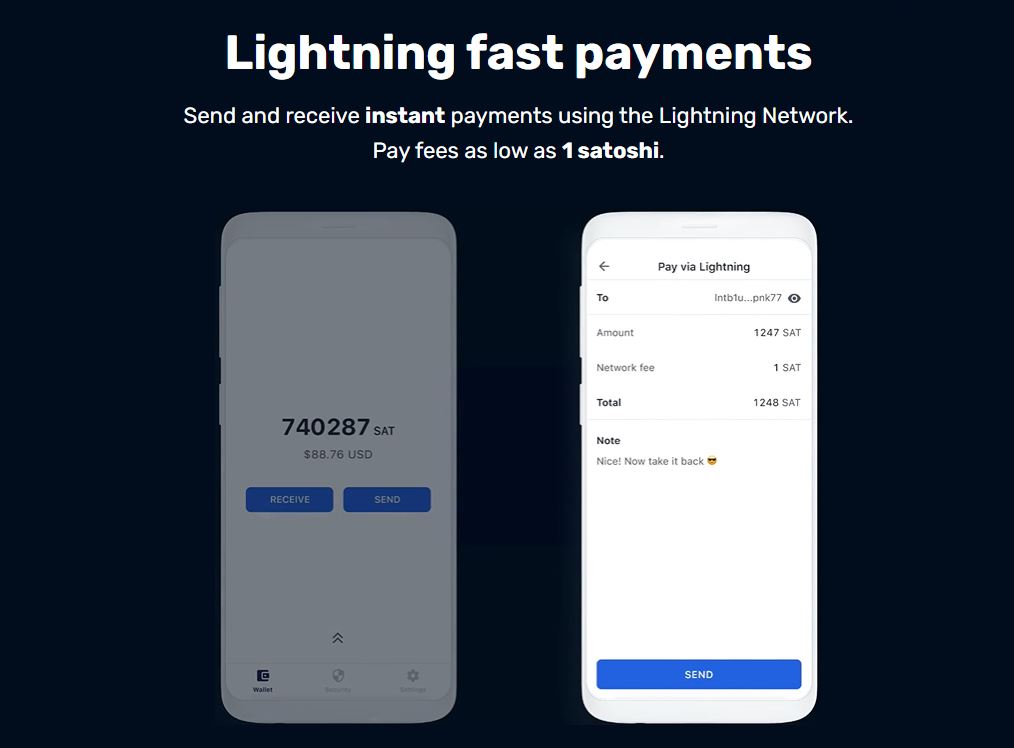
Muun’s signature feature is a unified balance that spans on-chain Bitcoin and Lightning. You scan a Lightning invoice, tap send, and the wallet handles the rest. No channels to open, no inbound liquidity to purchase, no routing failures to debug.
Under the hood, however, Muun is not a native Lightning wallet. It uses submarine swaps to bridge on-chain Bitcoin and Lightning. When you pay a Lightning invoice through Muun, the wallet constructs an on-chain transaction that a swap provider converts into a Lightning payment at the last step.
Receiving Lightning works in reverse: a swap provider receives the Lightning payment and deposits on-chain Bitcoin into your wallet.
That design means every Lightning transaction carries on-chain fees. When the mempool is calm, the cost is negligible. When fees spike, a simple Lightning payment through Muun can cost $3 to $5 or more, while a native Lightning wallet like Phoenix would charge less than a penny for the same payment.
Independent reviewers estimate Muun’s Lightning fees run 10 to 50 times higher than Phoenix or Breez under normal conditions.
Muun does not publish a formal fee schedule. On-chain transactions pay standard miner fees, and the app includes a mempool-based estimator that the company says saves users roughly 30% on average compared with other wallets. For on-chain sends, that estimator is genuinely useful. For Lightning, the swap overhead is unavoidable.
Muun Staking and Yield:
Muun offers no staking, no yield, and no APY or APR of any kind. Multiple independent reviews confirm that staking is not available, and the wallet supports only Bitcoin, which has no native staking mechanism.
NOTE: If earning yield on your BTC is a priority, Muun is not the right tool. This is a deliberate design choice, not an oversight: Muun is a spending and self-custody wallet, not a savings or yield product.
Muun Wallet Pros and Cons
Pros
- One of the easiest self-custody onboarding experiences in Bitcoin
- No KYC, no accounts, no email or phone number required
- Unified on-chain and Lightning balance with no channel management
- 2-of-2 multisig security with an open-source recovery tool
- Taproot enabled by default and a mempool-based fee estimator for on-chain sends
Cons
- Lightning fees can be 10 to 50 times higher than native Lightning wallets
- No seed phrase: recovery relies on a PDF Emergency Kit and a written code
- Weak privacy relative to node-based wallets because Muun’s servers see transaction data
- No coin control, no UTXO management, no labeling, no RBF
- Bitcoin only, with no staking or multi-asset support
How Muun Compares to 7 Other Bitcoin Wallets
The table below reflects typical fee structures and custody models. Actual fees vary with mempool conditions and provider policies.
| Wallet | Type & Custody | Lightning Model | Send Fee (Lightning) | On-Chain Fee | Staking | Best For |
|---|---|---|---|---|---|---|
| Muun | Mobile, self-custodial 2-of-2 multisig | Submarine swaps | Swap fee + routing, often $0.10 to $5+ | Standard miner fee, estimator included | No | Beginners wanting one simple balance |
| Phoenix | Mobile, self-custodial | Native Lightning channels | 0.4% + 4 sats | Standard miner fee | No | Frequent Lightning spenders |
| BlueWallet | Mobile/desktop, self-custodial | External LNDhub since 2023 | Routing and infrastructure costs vary | Standard miner fee | No | Flexible Bitcoin users who want optional Lightning |
| Breez | Mobile, self-custodial | Native Lightning with LSP | Around 0.4% channel open plus swap fees | Standard miner fee | No | Lightning users who want a polished app |
| Wallet of Satoshi | Mobile, custodial | Native Lightning | Often zero internal fees; routing only | 1.95% on on-chain sends | No | Instant small payments with minimal setup |
| Electrum | Desktop/mobile, self-custodial | None native | N/A | Standard miner fee, full coin control | No | Advanced users and privacy-focused Bitcoiners |
| Ledger Nano | Hardware, self-custodial | Via third-party apps | Depends on connected app | Standard miner fee plus device cost | No | Long-term cold storage |
| Trezor | Hardware, self-custodial | Via third-party apps | Depends on connected app | Standard miner fee plus device cost | No | Open-source-focused cold storage |
Phoenix charges a flat 0.4% plus 4 sats to send over Lightning, with free receiving when liquidity is sufficient. Channel creation or inbound liquidity requests cost 1% plus mining fees, and users on Reddit and app stores frequently describe the fees as high relative to expectations.
For daily coffee-sized payments, Phoenix is dramatically cheaper than Muun on the Lightning side.
BlueWallet does not charge platform or subscription fees for standard Bitcoin operations. Users pay network fees, and Lightning payments may carry routing or infrastructure costs. BlueWallet discontinued its hosted Lightning service in 2023, so Lightning now requires an external LNDhub connection.
It is more flexible than Muun but less turnkey.
Breez uses a native Lightning model with a liquidity service provider. Channel opening is around 0.4%, and swap services are billed around 0.5% plus mining fees. User reports of a 2,500 sat fee on a 3,000 sat self-send show that small transactions can still be expensive, but the architecture is more efficient than Muun’s submarine-swap model.
Wallet of Satoshi is custodial, which means you do not hold keys. Lightning sends and receives are often free or carry only tiny routing fees, while on-chain sends cost 1.95% plus network fees. It is the most downloaded Lightning wallet globally, with over one million users, but the trade-off is counterparty risk.
Electrum charges no wallet fee at all. Users pay only Bitcoin network fees, and the wallet offers full coin control, UTXO management, and Tor support. It is not beginner-friendly, and it does not offer native Lightning, but for privacy-conscious on-chain users it remains a benchmark.
Ledger Nano devices cost between $79 and $399 depending on the model. Ledger does not charge recurring custody fees, but recent changes introduced $10 fees for certain multisig transactions and 0.05% token transfer charges on newer hardware, drawing criticism from self-custody advocates. On-chain network fees still apply.
Trezor hardware wallets range from $59 to $249 for the Safe series.
Alos, trezor does not charge custody or subscription fees, and third-party swap providers inside Trezor Suite apply their own spreads of roughly 1% to 2.5%. Customer data leaks through third-party vendors have been a recurring criticism on Reddit.
What Reddit and Forums Reflect
The online sentiment around Muun is split along a predictable line: beginners love the simplicity, while Lightning users warn about fees.
On Reddit’s r/BitcoinBeginners, one user tested Muun against Aqua and Green and found that Muun was cheaper for a one-time exchange-to-cold-storage flow because it saved steps and fees, totaling roughly 1.6% in their test. The same user noted that Muun is often called “more expensive” because it is not a true Lightning wallet, but for occasional stacking and withdrawal, the math can work in Muun’s favor.
Other threads and app store reviews tell a different story. Users on Bitcoin Forum and Stack Exchange report failed Lightning transfers, unexpected fee changes, and incoming Lightning transactions being refused when L1 fees are high. An Apple App Store reviewer criticized Muun for automatically checking clipboard contents when tapping “Receive,” calling it a privacy concern.
A Trustpilot reviewer praised the wallet as “muy buena” and said the negative experiences they had read were unrelated to the wallet itself, while another user on a review platform claimed fees consumed an unreasonable share of small transfers.
The fairest summary from forums and review sites is this: Muun is an excellent starter wallet and a solid on-chain option, but it is the wrong tool for frequent small Lightning payments. Reviewers consistently score its ease of use around 9 out of 10 while pulling the overall score down to the 6.8 to 7.5 range because of the fee architecture and recovery model.
Frequently Asked Questions
Is Muun Wallet custodial or non-custodial?
Muun is self-custodial under a 2-of-2 multisig model. You hold one key on your phone, and Muun holds a second encrypted key on its servers. Both are required to spend, so Muun cannot unilaterally move your funds, and a thief with only your phone cannot either.
Does Muun Wallet support staking or yield?
No. Muun offers no staking, no APY, no APR, and no yield products of any kind. It supports Bitcoin only, and Bitcoin has no native staking mechanism.
Why are Muun’s Lightning fees higher than other wallets?
Muun uses submarine swaps to bridge on-chain Bitcoin and Lightning. Every Lightning payment involves an on-chain transaction, so you pay miner fees even when the payment itself is routed over Lightning. Native Lightning wallets keep payments inside channels and charge only tiny routing fees.
Does Muun require KYC or an account?
No. There is no KYC, no email, no phone number, and no account creation. You are in self-custody from the first screen.
How does Muun backup and recovery work?
Muun does not use a 12-word seed phrase. Instead, it provides an Emergency Kit PDF containing encrypted keys and output descriptors, plus a separate Recovery Code. You can restore funds using Muun’s open-source recovery tool without relying on Muun’s servers, but no other wallet can import the account from twelve words.
Is Muun good for daily Lightning spending?
Generally no. The submarine-swap design makes small, frequent Lightning payments expensive during fee spikes. If daily Lightning spending is your goal, Phoenix, Breez, or Wallet of Satoshi are better fits.
What is the best use case for Muun Wallet?
Muun is best for beginners moving their first sats off an exchange, for occasional on-chain self-custody, and for users who want a single balance without channel management. It is a starter wallet and a spending wallet, not a Lightning power-user tool or a yield product.
Does Muun support Taproot and SegWit?
Yes. Taproot addresses (bc1p) are enabled by default, and the wallet supports SegWit and Bech32 addresses. On-chain transactions benefit from lower fees and better privacy relative to legacy address formats.








2 Comments